On this page13 sections
- What pivoting means in OSINT
- How Deep Search works
- What it follows, and what it skips
- Depth and cost
- Where Deep Search can mislead you
- If you're checking your own footprint
- How it compares
- FAQ
- What is Deep Search on Fingerprint.to?
- How much does Deep Search cost?
- Which plans include Deep Search?
- Does Deep Search prove that linked accounts belong to the same person?
- Can Deep Search start from an email or phone number?
Deep Search is Fingerprint.to's automatic pivoting engine. When a search turns up a new username or email on someone's profile, Deep Search searches it too, across every module, then does the same for whatever that search finds, up to three layers deep. One starting handle can fan out into dozens of linked identities without you typing a second query.
This post explains how it decides what to follow, what it ignores, what it costs, and where it can mislead you.
What pivoting means in OSINT
A pivot is when one finding becomes your next search. An Instagram bio links a TikTok. The TikTok links a Linktree. The Linktree lists a Ko-fi under a handle you've never seen. Every hop is a new lead, and real investigations are mostly made of these hops.
Doing it by hand is slow. You copy each new handle, run a fresh search, scan the results for more handles, and repeat. Most OSINT tools stop at a "search this username" button next to a result, which still leaves you to run every hop yourself.
Deep Search is different. It runs the whole chain on its own, inside your original search, and every result streams into the same view.
How Deep Search works
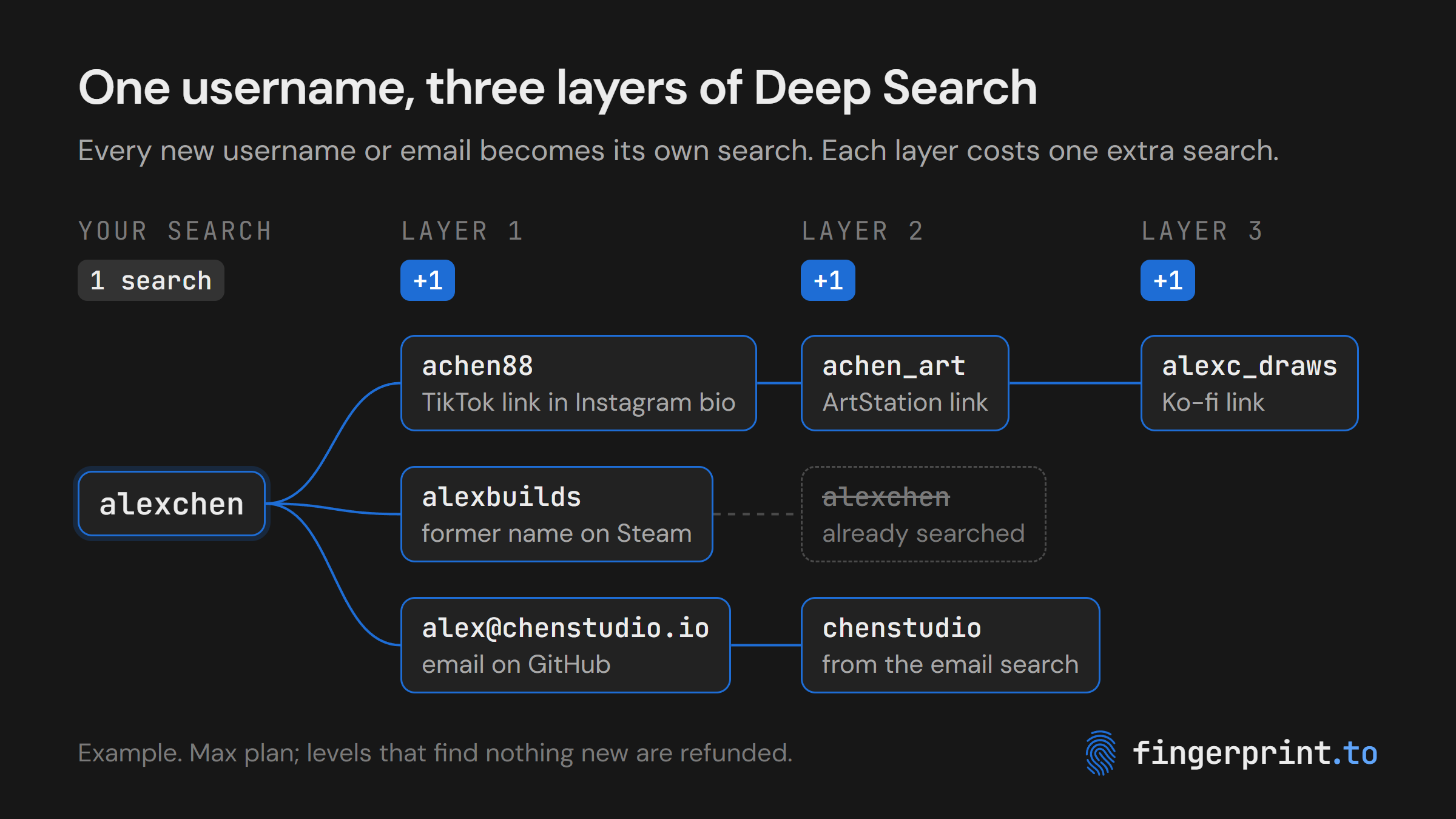
- Your search runs normally. A username search checks about 750 sites, and an email search or phone search runs its own modules.
- Each hit is scanned for new identities. Deep Search reads only the profile fields that point somewhere else: the username, email fields, bio, website, link lists, contact info, payment handles and former usernames.
- Links are turned into handles. It recognizes profile links for more than 70 platforms, including Instagram, TikTok, X, GitHub, Reddit, Twitch, YouTube, Telegram, Steam, Venmo, Cash App, PayPal, Linktree and Carrd. It also reads @mentions in bios, and it resolves YouTube channel IDs and Facebook profile IDs into the handles behind them.
- Every new identity gets its own search. A new username runs across all username modules, and a new email runs across all email modules.
- Nothing is searched twice. Each username and email runs once per search, ignoring capitalization. If a layer-2 profile links back to your original handle, it's skipped.
- It repeats until the depth you picked. Identities found in layer 1 results feed layer 2, and layer 2 feeds layer 3.
Every result card from a pivot is labeled with where it came from, so you can trace any account back to the profile that led to it.
What it follows, and what it skips
Profiles are full of things that look like handles but aren't. Deep Search filters these out before spending any time on them:
| Followed | Skipped |
|---|---|
| Profile links to 70+ platforms in bios and link fields | Handles shorter than 3 characters |
| @mentions in bios | Site pages like /about, /login or /explore |
| Emails listed on a profile | Domains and file names (example.com, widget.js) |
| Former usernames | Long numeric IDs that point to posts or pages, not people |
| YouTube and Facebook IDs, resolved to handles | Role inboxes like noreply@, support@ or info@ |
| Avatar and banner image links |
You can also choose what kinds of identity to follow: usernames, emails, or both. Your starting search always runs in full either way. The filter only changes which discoveries get pivoted.
Depth and cost
You pick a depth from 1 to 3 before searching. Each layer adds one search in total, no matter how many new identities it finds.
| Depth | Cost | What gets searched |
|---|---|---|
| Off | 1 search | Your query only |
| 1 | 2 searches | Your query, plus every identity found on its results |
| 2 | 3 searches | Plus every identity found on layer 1 results |
| 3 | 4 searches | Plus every identity found on layer 2 results (slowest) |
The cost shows on the search button before you start, and it's charged up front, because nobody can know in advance how far a chain will go. When the search completes, any layer it never reached is refunded. If your query's results contain nothing new to follow, you pay exactly what a normal search costs.
Compare that with pivoting by hand: if your first search turns up 8 new handles, checking them all yourself costs 8 more searches. Deep Search covers all 8 for one.
Deep Search is included on the Max plan ($100/month for 2,500 searches) and Enterprise. Details are on the pricing page.
Where Deep Search can mislead you
Deep Search assumes that if a profile links to another account, the two are related. That's usually true, but not always, which is why the app labels it experimental. Common false leads:
- Friends and collaborators. A bio that says "art by @someone" or links a partner's channel will pull that person's accounts in too.
- Common handles. A pivot to a short or popular username like
alex88will match strangers on other sites. - Shared and business emails. A studio or team address leads to everyone who uses it.
- Layer 3 drift. Each layer is one more assumption. The deeper a result is, the more it needs checking.
Treat every pivot as a lead, not a conclusion. Before you link an account to your subject, look for at least two independent matches: the same avatar or photos, the same display name, a consistent location, links in both directions, or creation dates that fit the timeline. Each card's "discovered from" label shows you which hop to check.
If you're checking your own footprint
Deep Search shows how a single link stitches your accounts together. One Linktree in an Instagram bio can be enough to connect a gaming handle, a payment app and an old forum name into one profile.
If you want accounts kept separate, remove the links between them, use different handles, and check which sites still show your former usernames. Payment apps are a common weak point; we covered why in how Venmo, Cash App and PayPal link your username to your real name. If Fingerprint shows something you want gone, see our opt-out page.
How it compares
Most commercial OSINT platforms let you click a username in a result to start a new search. That's still one manual hop at a time. We don't know of another commercial platform that follows a chain of pivots automatically.
The closest equivalent we know of is open source. Maigret, a popular command-line username checker with about 39k GitHub stars, can run a recursive search on the usernames and IDs it discovers. It's free and lists 5,900 supported sites (it checks the top 500 by default). If you're comfortable installing and running a Python tool, it's worth knowing.
Deep Search does the same job in the browser with nothing to install. It follows emails through Fingerprint's email modules as well as usernames, and it labels every result with the hop that found it.
FAQ
What is Deep Search on Fingerprint.to?
Deep Search is an automatic pivoting feature. When a search finds new usernames or emails on a matching profile, Deep Search searches those too, across every module, and repeats for up to three layers. It turns one starting username, email or phone number into a map of linked accounts.
How much does Deep Search cost?
Each layer adds one search to the cost, however many new identities it finds. Depth 1 costs 2 searches, depth 2 costs 3 and depth 3 costs 4. Layers the search never reaches are refunded when it completes.
Which plans include Deep Search?
Deep Search is available on the Max plan ($100/month for 2,500 searches) and on Enterprise. It isn't part of the free demo or the Pro plan.
Does Deep Search prove that linked accounts belong to the same person?
No. Deep Search assumes that linked profiles are related, so it can pick up friends, collaborators or strangers who share a common handle. Treat each pivot as a lead and confirm it with matching photos, names, locations or links in both directions.
Can Deep Search start from an email or phone number?
Yes. Deep Search works from username, email and phone searches. Whatever usernames and emails turn up in the results are followed, and you can choose to follow usernames only, emails only, or both.